
Get Instant Access
Enter your email to read the full resource and access all our free content.
By signing up, you'll also join our newsletter. We'll occasionally send you updates, tips, and other useful resources. You can unsubscribe any time.
Use Claude Code Subagents To Build A Content System (No Code)
Full Demo
Where Subagents Sit In The Stack
Looking at the four layers:
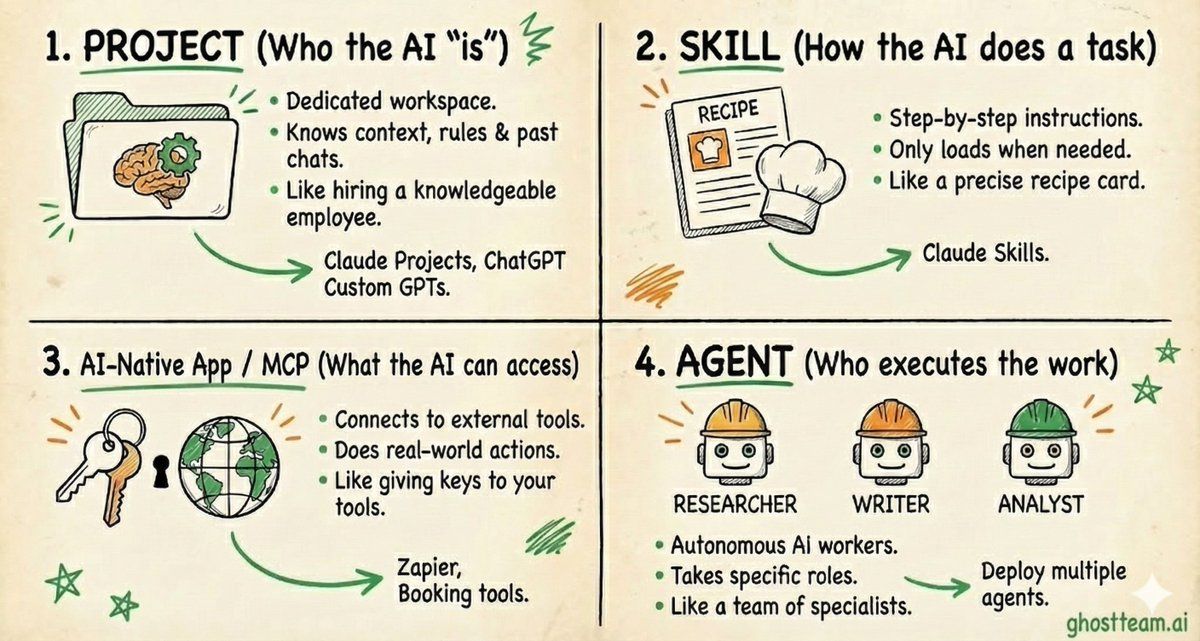
Project vs Skills vs AI-native App / MCP vs Agent
Subagents are layer 4. The workerBut they pull from everything above:
- They operate within your Project context
- They load specific Skills for their task
- They connect to MCP tools for external capabilities
A subagent without skills is generic.A subagent with skills trained on your brand, your voice, your data - that's where the real leverage comes from.
This is why I'm building skills alongside subagents.
The subagent handles the workflow. The skill handles the quality.
Together they create systems that actually work like you do.
What Are Claude Code Subagents
Let's start with the basics.
Claude Code is a command line interface made by Anthropic. It works in your terminal.
You give it requests in natural language, and it executes.
Typically people use it for coding tasks.
But here's what changes everything: They've built a subagent architecture.
Instead of one AI trying to do everything, you have multiple agents structured around specific tasks.
Each agent gets its own tools. Its own prompts. Its own context window.
Here's the flow:
You give a request.
Claude Code routes it to the right primary agent. Maybe it's content. Maybe it's debugging. Maybe it's design.
The primary agent then decides which subagents it needs.
Those subagents each have:
- Specific tools - APIs, scrapers, whatever they need
- Specific prompts - tailored instructions so they don't get confused with massive generic prompts
- Training data - deep knowledge on their domain
- Their own context window - they work in parallel, not fighting for space
When a subagent finishes, it passes back to the primary agent.
The primary agent assembles everything and returns the result to you.
Why does this matter?
Because giving one agent a huge prompt to do multiple things makes it confused.
This architecture keeps each piece focused.
Better outputs. Every time.
How To Actually Build One
Here's where most guides lose people.
They explain what something is but never show you how to do it.
So let me make this stupidly simple.
The easiest way:
Use the /agents command
In Claude Code, just type:/agents
That's it.
An interactive menu opens. Select "Create New Agent."
It asks you a few questions:
- What's the name?
- What should it do?
- What tools can it access?
Answer them. Done.
You can even let Claude generate the subagent for you first, then customize it yourself.
No terminal commands. No file creation. No coding.
How Skills Power Subagents
My content creator subagent doesn't just have generic instructions.
It loads a Claude Skill specifically trained on my writing style.
That skill contains:
- My top performing posts
- My sentence structure patterns
- My content pillars and how each one sounds different
- Words I use. Words I avoid.
- How I format posts
When the subagent runs, it doesn't guess how I write. It knows.
So the architecture looks like this:
Subagent (Content Creator) → Skill (My LinkedIn Writing Style) → MCP Tools (Perplexity for research, Nano Banana for images)
The subagent is the worker. The skill is the training. The MCP tools are the capabilities.
Stack them together and you get a content system that actually sounds like you. Researches like you would. Creates visuals that match your brand.
A subagent without skills is generic. A subagent with skills trained on your voice, your data, your brand – that's where the real leverage comes from.
The Content System I Built
Now let me show you what's actually possible.
Here's the architecture:
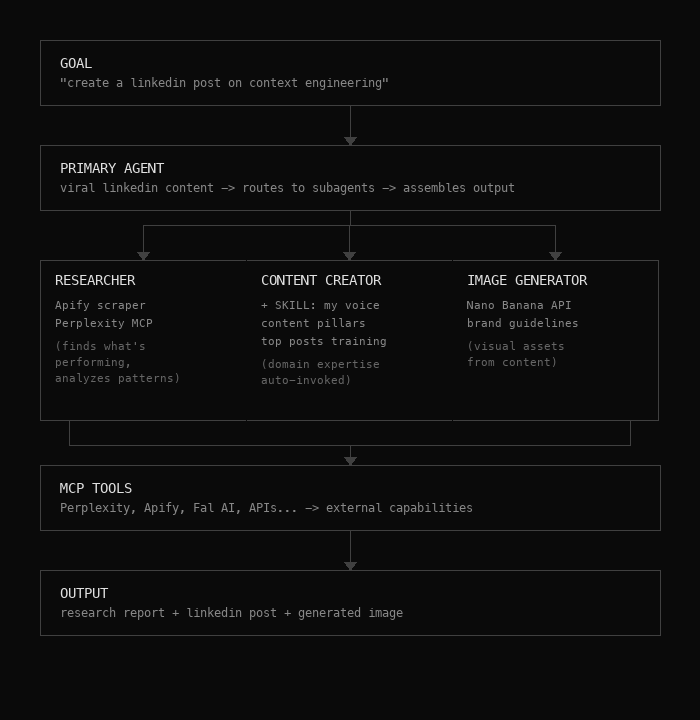
Sub Agent Architecture
It starts with a goal: "create a LinkedIn post on context engineering"
That routes to the Primary Agent - Viral LinkedIn Content.
This agent doesn't do the work itself. It routes to subagents and assembles the final output.
From there, it delegates to three specialized subagents:
Subagent 1: The Researcher
This agent has access to:
- Apify scraper - searches keywords, scrapes top performing posts for that topic
- Perplexity MCP - deep research on any subject
It finds what's performing. Analyzes patterns. Understands what's working before anything gets created. Completely autonomous.
Subagent 2: The Content Creator
This is where my Claude Skill does the heavy lifting. The subagent handles the workflow. The skill handles the quality.
It's trained on:
- My voice
- My content pillars
- My top posts
Each pillar has a different style. Insights. Thought leadership. Building in public. Demos. Lead magnets.
The agent understands those styles and creates content based on the research it received. Domain expertise. Auto-invoked.
Subagent 3: The Image Generator
This one connects to the Nano Banana API. It takes the content of the post and generates visual assets that match. I've given it my brand guidelines.
With proper training, you get stylized images automatically.
All three subagents connect to MCP Tools - Perplexity, Apify, Nano Banana, whatever APIs you need for external capabilities.
The Output: research report + LinkedIn post + generated image. All from one prompt.
Watching It Work
Let me walk you through what actually happens.
I open Cursor.
In the terminal, I type: "I want you to create a LinkedIn post for me. Do the necessary research, then create the content, then generate the image. Use the necessary subagents. Create the post on context engineering."
Here's what happens:
First - It immediately creates a to-do list. It understood the workflow.
Second - It calls the research agent. That agent creates its own sub to-do list:
- Current trend reviews
- Analyzing engagement patterns
- Compile research into a report
You can watch it tick through each component as it goes.
Third - It outputs all that research into a dedicated folder. A separate file with hashtag analysis, popularity data, detailed findings.
Fourth - It moves to phase two. Pulls in the content creator agent. Calls my training data. The skill with my writing style. The content pillar guidelines.
Fifth - It generates the post. Saves it to the content folder.
Sixth - Calls the image generator agent. Accesses the Nano Banana API. Creates the image.
Seventh - Outputs everything. The research. The post. The images.
All from one prompt.
Ready to build your MCP App?
Book a strategy call with our team to understand what ChatGPT & Claude Apps can mean for your business