
Get Instant Access
Enter your email to read the full resource and access all our free content.
By signing up, you'll also join our newsletter. We'll occasionally send you updates, tips, and other useful resources. You can unsubscribe any time.
The Complete Guide to ChatGPT App Discoverability
Why This Guide Matters More Than Ever
Join us for an hour webinar where we’ll build a ChatGPT App live! Free sign up here
————-
This guide focuses on ChatGPT app discoverability - but here's the bigger picture you need to understand.
ChatGPT and Claude now share the same underlying standard: MCP (Model Context Protocol). When you build an MCP app, it works across both platforms. And when Anthropic launched MCP Apps in Claude this week, they created a second massive discovery surface for your app.
The principles in this guide apply to both ecosystems.
The metadata you write - your app name, tool descriptions, parameter documentation - determines whether AI models suggest your app to users. That's true in ChatGPT. It’ll very likely be true in Claude. And for VS Code, Goose, JetBrains, and every other client that adopts MCP.
Right now, ChatGPT has the more mature App Store with 80+ apps and established search mechanics. Claude is at launch partners only - Slack, Figma, Asana, Canva, Salesforce, and a handful of others. But Claude's ecosystem will grow, and when it does, the developers who already understand discoverability will have a significant head start.
Think of this as learning SEO in 2005. The specific ranking factors may evolve, but the foundational skill - understanding how algorithms decide what to surface - compounds over time.
Everything below is written for ChatGPT because that's where we can test and measure today. But you can think of it as principles for your playbook for MCP app discoverability everywhere.
The Discoverability Problem
You built a great ChatGPT app. It works perfectly. Users love it when they find it.
But discoverability determines success. It's like making sure you rank on Google - you only get results if users find you first.
Why Discoverability is the Bottleneck
ChatGPT has +850 million weekly active users. The App Store is live and growing. But unlike the early days of the iPhone App Store - where getting in early meant automatic visibility - ChatGPT apps don't get discovered by accident. There's no "new releases" section (yet) that guarantees eyeballs.
Discoverability is the bottleneck for growth. You can build the most useful app in the ecosystem, but if ChatGPT doesn't know when to suggest it - or if users can't find it when they search - your app won't get used.
The developers who understand this early will dominate the rankings as the ecosystem matures. Just like mobile ASO (App Store Optimization) became a discipline unto itself, ChatGPT app discoverability will become essential knowledge for anyone building in this space.
How ChatGPT Discovery is Different
Early signs show the ChatGPT App Store will work like traditional app stores - users can browse categories and search for apps. But there's a second discovery channel that's unique to ChatGPT: apps can also appear organically during conversations when the LLM decides they're relevant to what the user is trying to do.
This presents a new major opportunity for your app to appear after high volume, highly specific prompts when the user is at the exact moment of intent.
Therefore, this means your metadata does double duty. It helps you rank in search results, AND it tells ChatGPT when to suggest your app mid-conversation.
This guide covers both channels and what actually matters for each.
The Two-Channel Framework
ChatGPT app discoverability happens in two distinct places:
Channel 1: App Store Search (Static) When users search for apps in the ChatGPT App Store, your app needs to rank for relevant keywords. This is traditional ASO—keywords in your name, description, and metadata determine where you appear in search results.
Channel 2: Prompt Optimization (Dynamic) When users have conversations in ChatGPT, the LLM decides which apps to suggest based on conversation context. Your tool descriptions tell ChatGPT when to invoke your app.
Why both matter: Users discover apps two ways:
- Active discovery: "I need an app for X" → searches/browses App Store → finds your app
- Passive discovery: "Help me do X" → ChatGPT suggests your app mid-conversation → user connects
Optimizing for both here is critical. And particularly passive discovery as this will be higher volume and you'll reach a user in their workflow at the exact moment of intent.
Appearance vs. Volume: The Two Questions
For each channel, there are two distinct questions to answer:

App Store Search and Prompt Optimization
But it's not just about chasing the highest volume keywords and prompts. You also want to appear for prompts that are highly specific to your use case - where your app and its tools are genuinely aligned with what the user is requesting. These specific prompts give you the highest likelihood of actual usage, because when your tool is the right fit, users convert.
But high volume alone isn't the goal. You want prompts that balance volume, specificity to your use case, and relevance to your target audience. The sweet spot is prompts asked frequently by your ideal users for tasks your app handles exceptionally well.
PART 1: Before You Optimize
Why Metadata Matters
ChatGPT decides when to call your app based on the metadata you provide. Your app name, description, tool names, and parameter docs all feed into how the model determines whether your app is relevant to a user's request.
Well-crafted metadata increases recall on relevant prompts and reduces accidental activations. Poor metadata means your app either doesn't show up when it should, or shows up when it shouldn't - both hurt user trust and your discoverability.
Treat metadata like product copy. It needs iteration, testing, and analytics - not a one-time setup.
Gather a Golden Prompt Set
Before you tune metadata, assemble a labelled dataset. This becomes your testing baseline for every change you make.
Direct prompts – users explicitly name your product or data source.
- "Use Notion to create a task called X"
- "ChatGig, create a gig for this contract"
Indirect prompts – users describe the outcome they want without naming your tool.
- "I need to organize my notes"
- "Help me find a freelancer to finish this contract"
Negative prompts – cases where built-in tools or other connectors should handle the request.
- "Tell me about the best project management tools"
- "What's the history of the gig economy"
Document the expected behaviour for each prompt: should your tool be called, do nothing, or defer to an alternative?
PART 2: App Store Search Optimization
How App Store Search Works
The ChatGPT App Store uses traditional search mechanics. Keywords in your metadata determine where you appear when users search.
What to Optimize
App Name Either your company name or ideally, think about your most important keyword. This is prime real estate.
Description Write naturally for users, but include relevant keywords. Your description appears in search results.
Screenshots Must be exactly 706 pixels wide (per submission requirements). Show:
- Your best use cases
- The actual prompts users should try
- Clear visual examples of output
Our observation: Every screenshot should include the prompt that triggers it. Users see "Create a gradient tweet" → screenshot → understand exactly what your app does.
Test Cases for Submission
OpenAI requires at least five test cases for submission, showing:
- Scenario
- Prompt
- Tool that will be triggered
- Expected output
They also test negative cases - prompts where your app should NOT trigger.
Our observation: Use your golden prompt set as the foundation for test cases. You've already tested these - just format them for submission.
PART 3: Prompt Optimization
This is where the official OpenAI documentation provides the most guidance. Everything in this section is grounded in their Optimize Metadata guide.
Tool Execution vs Organic Discoverability
Right now, what you're optimizing for is tool execution - making sure your app responds correctly when it's called. The right tool fires, with the right parameters, producing the right output.
Soon, the same metadata will likely determine organic discoverability too - whether ChatGPT suggests your app to users mid-conversation.
But since tool execution is what you can test and measure today, that's where this section focuses.
How Organic Recommendations Work
During a conversation, ChatGPT evaluates whether any connected apps might help with what the user is trying to do. It reads your tool names, descriptions, and parameter docs to decide if your app is a good fit for the current request - and if so, suggests it to the user.
This is different from App Store search. The model is interpreting intent and matching it against what your tools can do.
Our observation: Organic discoverability was briefly enabled, then disabled after users thought the suggestions were ads. When it returns, apps with optimized metadata will have a significant advantage.
What Affects Prompt Discoverability
Beyond your metadata, several contextual factors influence when and how consistently your app appears:
Prior usage creates preference. If a user has used your app before, ChatGPT is more likely to suggest it again for related prompts. Your first impression matters - get users to try your app once, and you've increased your future discoverability with that user.
Memory and context matter. ChatGPT's memory about user preferences and past activities can influence which apps surface. A user who frequently works on presentations may see design apps suggested more often. If a user enables memories, ChatGPT can pass that context to your MCP server during tool calls - you won't get to keep the data, but you can use it in the moment to tailor the experience and increase the likelihood your app gets suggested and improve the experience for the user.
Conversation depth affects suggestions. Apps may surface differently at turn 1 of a conversation versus turn 10. The accumulated context changes what ChatGPT considers relevant.
Consistency matters as much as appearance. It's not just whether your app appears - it's how reliably. An app that appears 80% of the time for a relevant prompt has more dependable discoverability than one that appears 40% of the time. When testing, track variance across multiple runs, not just single appearances.
These factors mean discoverability isn't fully within your control - but your metadata is. The sections below focus on what you can directly optimize.
Writing Your Tool Metadata
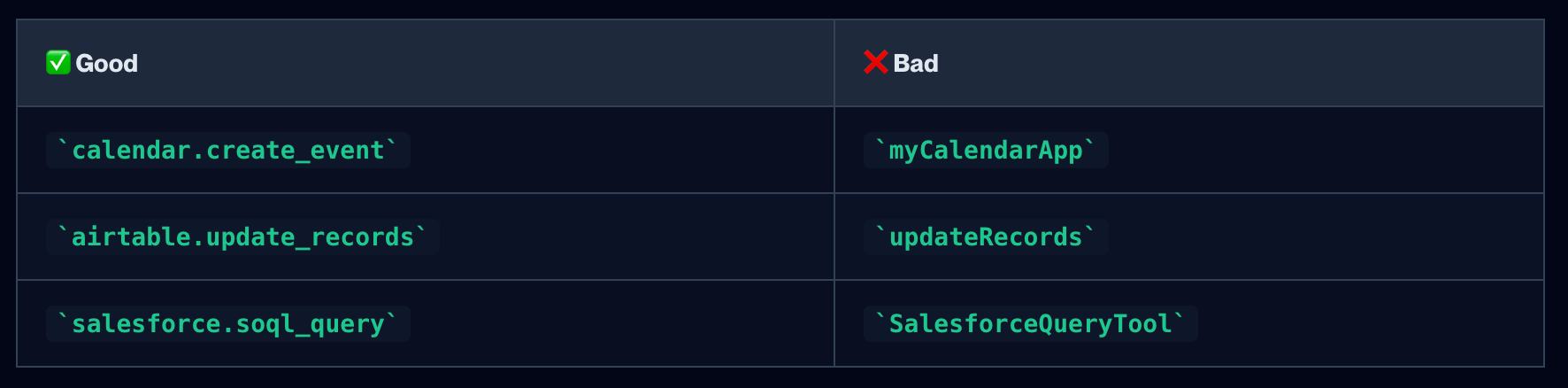
1. Name Structure: domain.action
Official guidance: "Pair the domain with the action."
Name Structure: domain.action
The format tells the LLM semantically what your tool does.
2. Description Clarity: "Use when" + "Do not use"
Official guidance: "Start with 'Use this when…' and call out disallowed cases."
Bad: "Queries the database"
Good (Airtable-style): "Use this when the user wants to update existing records in an Airtable table. To get baseId and tableId, you must first use the search_bases and list_tables_for_base tools. Do not use for creating new records - use create_records instead."
The description does two jobs: tell ChatGPT when to call you, and when NOT to call you.
3. Parameter Documentation with Examples
Official guidance: "Describe each argument, include examples, and use enums for constrained values."
{
  "name": "search_query",
  "type": "string",
  "description": "Company identifier to search for. Use ticker symbol (preferred) or company name. Examples: 'AAPL', 'MSFT', 'Tesla Inc', 'Amazon.com'"
}
The more specific you are, the better ChatGPT understands how to fill parameters from natural language.
4. Tool Hints
Official guidance: Use these annotations to help ChatGPT handle your tools appropriately:
- readOnlyHint: true - For tools that only retrieve or compute information and never create, update, delete, or send data outside of ChatGPT.
- destructiveHint: false - For tools that don't delete or overwrite user data
- openWorldHint: false - For tools that don't publish content or reach outside the user's account
5. Going Beyond Basic Descriptions
The best ChatGPT apps treat tool descriptions as runtime instructions, not API documentation. The LLM reads them at execution time, so write them like you're instructing a junior developer who needs to know exactly what to do.
Here are patterns that significantly improve how ChatGPT handles your tools:
Enforce prerequisites If your tool needs data from another tool first, say so explicitly:
"Before calling this tool, you MUST first use the query tool to get the record ID."
Show negative examples Telling ChatGPT what NOT to do is surprisingly effective. Most descriptions only show happy paths:
"NOT: discover_companies('Apple Inc.') - use ticker symbol like 'AAPL' instead"
Define fallback strategies Don't assume ChatGPT will retry intelligently. Tell it what to try when the first approach fails:
"1. PRIMARY: Search by ticker symbol. 2. SECONDARY: Search by company name (only if ticker fails). 3. FALLBACK: Try alternative name forms"
Encode pause points for user confirmation When you need user input before proceeding:
"Present the available options to the user and ask which one they want before proceeding."
Real example from Salesforce's Agentforce:
The summarize_conversation_transcript tool description is ~500 words and includes:
"CRITICAL WORKFLOW: Before calling this tool, you MUST follow these steps: 1) If call ID is not known, use the soql_query tool to query BOTH VoiceCall AND VideoCall entities in SEPARATE queries..."
It goes on to specify output formatting rules, PII guardrails, and instructions for handling edge cases. This isn't documentation—it's a system prompt hiding in a tool description.
PART 4: Testing & Iteration
Option 1: Do It Yourself
Stage 1: Evaluate in Developer Mode
You need ChatGPT Plus ($20/mo) to access Developer Mode. Enable it via Settings → Apps & Connectors → Advanced Settings.
- Link your connector in ChatGPT developer mode
- Run through each prompt in your golden set (from PART 1) and record the outcome - which tool was selected, what arguments were passed, and whether the component rendered correctly
- Track precision (did the right tool run?) and recall (did the tool run when it should?)
If the model picks the wrong tool - or fails to pick yours - you've identified a metadata problem.
Stage 2: Iterate Methodically
Change one thing at a time. If you change multiple metadata fields at once, you won't know which change caused the improvement or regression.
Keep a log of revisions. Document each change with timestamps and test results. This becomes your optimization history.
Rerun your golden prompt set after every change. Compare results to your previous run. Aim for high precision on negative prompts before chasing marginal recall improvements.
Stage 3: Production Monitoring
Once your connector is live, the work isn't done.
- Review tool-call analytics weekly. Spikes in "wrong tool" confirmations usually indicate metadata drift.
- Capture user feedback and update descriptions to cover common misconceptions.
- Schedule periodic prompt replays - especially after adding new tools or changing structured fields.
Option 2: Automate with appdiscoverability.com
The DIY approach works, but it's manual and time-consuming. Every metadata change requires re-running your golden prompt set, logging results, and iterating again.
appdiscoverability.com automates this entire loop. We run your prompts, track precision and recall, and help you refine your metadata - so you can focus on building your app, not running tests.
Coming Soon: Organic Discoverability
Everything above optimizes how your app performs when it's connected. But there's another question you'll need to answer: is your app being displayed in the first place?
Once organic discoverability is live, ChatGPT will suggest apps mid-conversation to users who haven't connected them yet. The same metadata you're optimizing now will determine whether you get surfaced.
But you won't be able to test this in developer mode - you're only seeing your own connected instance. To understand organic discoverability, you need to know:
- Is your app appearing for the prompts that matter to your target audience?
- How often are you appearing versus competitors?
- Which prompts are you winning, and which are you missing?
This requires data at scale - and that's what appdiscoverability.com provides. We test prompts across the ecosystem to show you where you're appearing, where you're not, and what to optimize next.
Get Your MCP App Discovered
Final Thoughts
Success isn't just about building a great product. It's about understanding the metadata game and how the discovery algorithm works. You can build the best app in the world, but if ChatGPT doesn't know when to suggest it, you'll get zero users.
Never depend entirely on this platform. Build your own distribution, capture emails, have an exit plan. Platforms always consolidate control eventually.
Optimize for both channels. Most developers focus on App Store search. The winners optimize for both search rankings AND prompt optimization.
Start tracking now. Document your metadata changes. Track which prompts trigger your app. Build your own historical baseline before the ecosystem matures.
Metadata is a living asset. The more intentional you are with wording and evaluation, the easier discovery and invocation become.
Ready to build your MCP App?
Book a strategy call with our team to understand what ChatGPT & Claude Apps can mean for your business