
Get Instant Access
Enter your email to read the full resource and access all our free content.
By signing up, you'll also join our newsletter. We'll occasionally send you updates, tips, and other useful resources. You can unsubscribe any time.
MultiPlatform Content Repurposing: Complete Workflow & Guide
Introduction
Transform YouTube Transcripts into LinkedIn, X, and Newsletter Content
About This Guide
This workflow transforms YouTube transcripts into multi-platform content including LinkedIn posts, X (Twitter) threads, and newsletter title ideas. It uses AI agents with custom training materials to maintain consistent brand voice across all platforms, automatically saving outputs to Airtable for content management.
Files & Documents
Files & Documents
- n8n JSON file
- LinkedIn Agent Training Material
- X Agent Training Material
- Newsletter Agent - if you don't already have a newsletter where you can train on your best posts, I'd recommend training of a few posts from a newsletter you're aspiring to.
Why You'll Want This
Why You'll Want This
- ✅ Repurpose one piece of content across three platforms simultaneously
- ✅ Maintain consistent brand voice using custom training materials
- ✅ Generate both long-form and short-form X content automatically
- ✅ Store all content drafts in Airtable for easy review and scheduling
What You'll Need to Run It
What You'll Need To Run It
- n8n Account: To set up and manage the workflow
- OpenRouter Account: API access for Gemini
- Google Account: Access to Google Docs for training materials
- Airtable Account: For storing generated content outputs
Content Repurpose Workflow
Content Repurpose Workflow
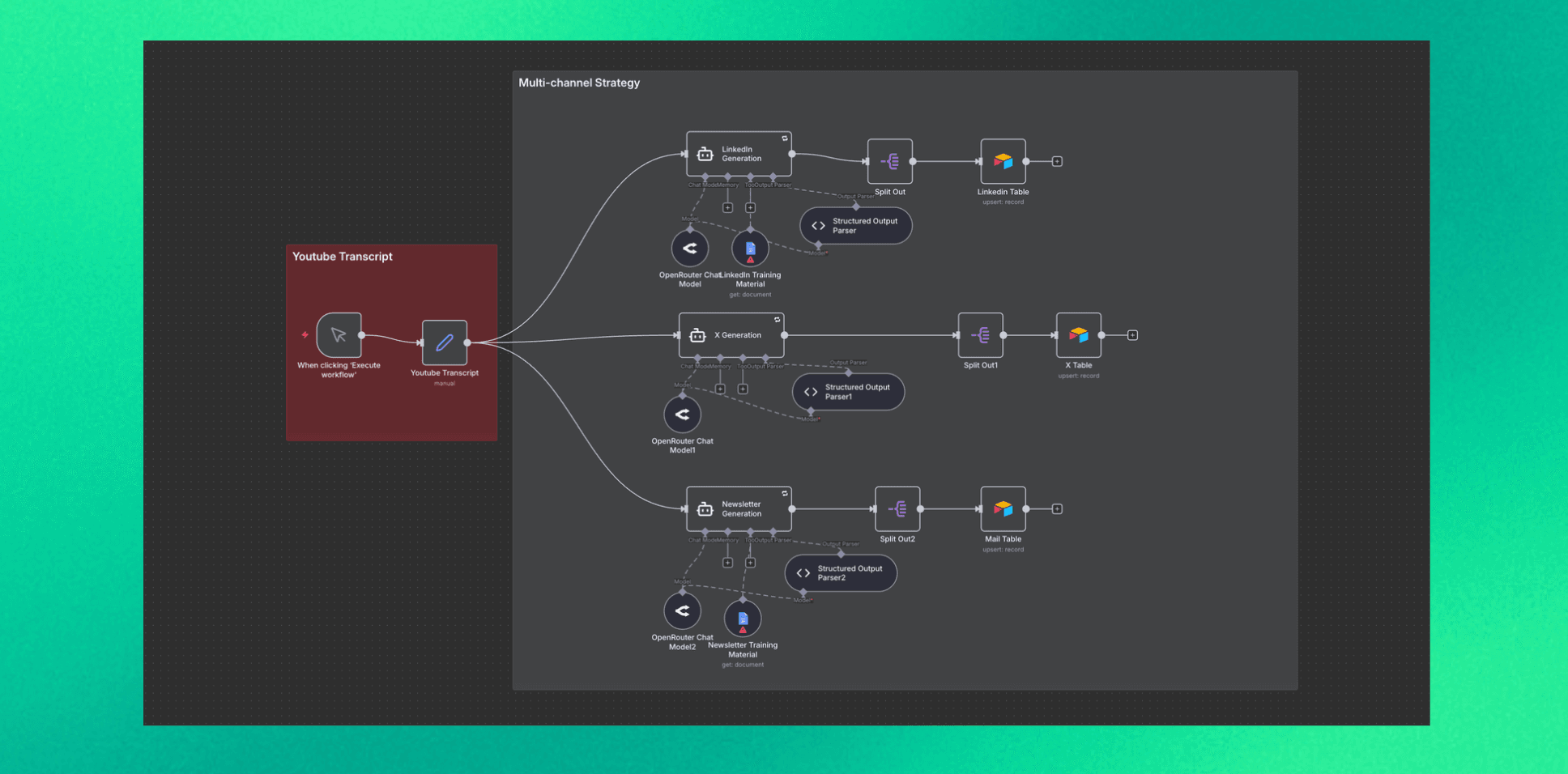
1️⃣ Manual Trigger (Node: n8n-nodes-base.manualTrigger)
Function: Initiates the workflow when you click "Execute workflow" in n8n.
Setup:
- No configuration required
- Simply click to run after pasting your transcript
2️⃣ Edit Fields - YouTube Transcript (Node: n8n-nodes-base.set)
Function: Stores the YouTube transcript as a variable for use across all generation branches.
Setup:
- Create a field named "Youtube Transcript"
- Paste your full transcript into the value field
- This feeds into all three content generation paths simultaneously
3️⃣ LinkedIn Generation (Node: @n8n/n8n-nodes-langchain.agent)
Function: Creates multiple LinkedIn posts from the transcript using brand voice training.
Setup:
- Set "Prompt Type" to "define"
- Configure the prompt to:
- Analyze the transcript for key topics
- Reference training materials for voice consistency
- Generate 3-7 posts covering different angles
- Enable the output parser for structured JSON output
- Set retry on fail with max 5 tries
Prompt Guidelines:
- Include writing style patterns (e.g., "So..." openings, lowercase tone)
- Specify formatting rules (arrows, emojis, word count targets)
- Define content themes and hook patterns
- Request JSON output with: hook, body, topic, estimated_engagement
4️⃣ X Generation (Node: @n8n/n8n-nodes-langchain.agent)
Function: Creates both long-form threads and short standalone X posts from the transcript.
Setup:
- Set "Prompt Type" to "define"
- Configure the prompt to generate two content types:
- Long-form: 2-4 thread-starters (3-5 tweets each)
- Short-form: 8-12 standalone posts
- Enable the output parser for structured JSON output
- Set retry on fail with max 5 tries
Prompt Guidelines:
- Adapt LinkedIn style for X's faster pace
- Maintain conversational tone and specific metrics
- Keep tweets under 280 characters
- Request JSON output with: type, content, topic, thread_count
5️⃣ Newsletter Generation (Node: @n8n/n8n-nodes-langchain.agent)
Function: Generates compelling newsletter title and subtitle combinations from the transcript.
Setup:
- Set "Prompt Type" to "define"
- Configure the prompt to create 5-7 title combinations
- Enable the output parser for structured JSON output
- Set retry on fail with max 5 tries
Prompt Guidelines:
- Create curiosity-driven titles (5-8 words)
- Include descriptive subtitles (8-15 words)
- Specify key angle and rationale for each
- Request JSON output with: title, subtitle, key_angle, rationale
6️⃣ Chat Model (Node: @n8n/n8n-nodes-langchain.lmChatOpenRouter)
Function: Provides the AI model for content generation across all three branches.
Setup:
- Select model: Claude Sonnet 4.5 (or your preferred model)
- Configure with your API credentials
- Each generation branch requires its own Chat Model node
Note: You can substitute with direct Anthropic API access if preferred.
7️⃣ Training Material Tools (Node: n8n-nodes-base.googleDocsTool)
Function: Provides reference documents so the AI can match your exact writing style and voice.
Setup:
- Set "Operation" to "get"
- Enter the URL of your Google Doc containing:
- Writing style analysis
- Post type taxonomy
- Engagement patterns
- Voice guidelines
- Connect to the relevant AI Agent node
Recommended Training Docs:
- Content analysis of your past posts
- Post type breakdown with examples
- Platform-specific adaptation strategies
8️⃣ Structured Output Parsers (Node: @n8n/n8n-nodes-langchain.outputParserStructured)
Function: Ensures AI outputs valid JSON that can be processed by downstream nodes.
Setup for LinkedIn Parser:
json
{ "type": "object", "properties": { "posts": { "type": "array", "items": { "type": "object", "properties": { "hook": { "type": "string" }, "body": { "type": "string" }, "topic": { "type": "string" }, "estimated_engagement": { "type": "string", "enum": ["low", "medium", "high"] } }, "required": ["hook", "body", "topic", "estimated_engagement"] } } }, "required": ["posts"] }
Setup for X Parser:
json
{ "type": "object", "properties": { "posts": { "type": "array", "items": { "type": "object", "properties": { "type": { "type": "string", "enum": ["long", "short"] }, "content": { "type": "string" }, "topic": { "type": "string" }, "thread_count": { "type": "number" } }, "required": ["type", "content", "topic", "thread_count"] } } }, "required": ["posts"] }
Setup for Newsletter Parser:
json
{ "type": "object", "properties": { "ideas": { "type": "array", "items": { "type": "object", "properties": { "title": { "type": "string" }, "subtitle": { "type": "string" }, "key_angle": { "type": "string" }, "rationale": { "type": "string" } }, "required": ["title", "subtitle", "key_angle", "rationale"] } } }, "required": ["ideas"] }
- Enable "Auto Fix" to handle minor JSON formatting issues
9️⃣ Split Out Nodes (Node: n8n-nodes-base.splitOut)
Function: Separates the array of generated posts into individual items for database storage.
Setup:
- LinkedIn Split: Set "Field to Split Out" to output.posts
- X Split: Set "Field to Split Out" to output.posts
- Newsletter Split: Set "Field to Split Out" to output.ideas
🔟 Airtable Storage (Node: n8n-nodes-base.airtable)
Function: Saves all generated content to Airtable tables for review and scheduling.
Setup for LinkedIn Table:
- Set "Operation" to "upsert"
- Create columns: Topic, Hook, Body, Estimated Engagement
- Map fields from the split output
- Set "Topic" as the matching column
Setup for X Table:
- Set "Operation" to "upsert"
- Create columns: Topic, Type, Content, Thread Count
- Map fields from the split output
- Set "Topic" as the matching column
Setup for Newsletter Table:
- Set "Operation" to "upsert"
- Create columns: Title, Subtitle, Key Angle, Rationale
- Map fields from the split output
- Set "Title" as the matching column
Workflow Architecture
Manual Trigger │ ▼ YouTube Transcript (Edit Fields) │ ├─────────────────┼─────────────────┐ ▼ ▼ ▼ LinkedIn Gen X Gen Newsletter Gen │ │ │ ▼ ▼ ▼ Split Out Split Out Split Out │ │ │ ▼ ▼ ▼ LinkedIn Table X Table Newsletter Table
What You'll Get
What You Get
This workflow yields organized content ready for each platform:
- 3-7 LinkedIn posts with hooks, bodies, and engagement predictions
- 2-4 X thread starters for long-form content
- 8-12 standalone X posts for quick engagement
- 5-7 newsletter title/subtitle combinations with strategic rationale
Benefits:
- Single transcript creates weeks of content
- Consistent voice across all platforms
- Content stored and organized in Airtable
- Ready for review, editing, and scheduling
Customization Tips
To use your own voice:
Create a Google Doc analyzing 50+ of your past posts
Link this doc to each AI Agent's training material tool
To add more platforms:
Duplicate an existing generation branch
Modify the prompt for the new platform's requirements
Create a new output parser schema
Add a new Airtable table
Get Help & Support
Get Help & Support
Need guidance? Contact us:
- LinkedIn: https://www.linkedin.com/in/elliotgarreffa/
- X (Twitter): https://x.com/elliot_garreffa
Interested in scaling your business?
Build AI growth systems.
Book a call: https://www.ghostteam.ai/begin
Ready to build your MCP App?
Book a strategy call with our team to understand what ChatGPT & Claude Apps can mean for your business