
Get Instant Access
Enter your email to read the full resource and access all our free content.
By signing up, you'll also join our newsletter. We'll occasionally send you updates, tips, and other useful resources. You can unsubscribe any time.
How to Build an MCP App with Fractal (No Code Required)
🎁 Exclusive Offer
Use code FRAC20 at Fractal for 20% off your subscription.
What Is Fractal?
No terminal. No code editor. No dependencies. Just prompting.
Fractal lets you go from idea to live MCP app in under five minutes. One app works across every major AI platform - ChatGPT, Claude, Copilot, Cursor, and more.
Watch a full demo on how to build an MCP App with Fractal here:
How to Build Your First App
Step 1: Start With a Clear Use Case
Before you touch any tool, know exactly what your app does. Not "a travel app" - that's too vague. A travel budget calculator that takes destinations, dates, travel style, and group size, then returns a realistic budget breakdown. The more specific you are, the better the result.
Step 2: Write a Simple Prompt
Go to Fractal and write one prompt:
"I want to build a travel budget calculator. Someone enters their destinations, dates, travel style, and group size. It returns a realistic budget breakdown with estimated costs for flights, accommodation, food, activities, and transport."
That's it. No technical specs. No wireframes. Just a clear description of what the app should do.
Step 3: Use Cases and Intent Mapping
This is where Fractal gets interesting. The first thing it does is come up with specific use cases for your app - the exact intents people are typing into ChatGPT. Fractal maps your app around them. Once the use cases look right, you approve them.
Step 4: Tools Get Built Around the Intent
ChatGPT apps are completely intent-based. When someone types a prompt, ChatGPT picks the tool that serves that intent. It's not a website where everything is visible at once - it's narrow and specific. Fractal confirms the tools it's going to build based on your use cases. Each tool maps to a specific intent. The right tool fires when the right prompt is typed. That's how ChatGPT apps work.
Step 5: Approve and Build
Click approve. Fractal's agents are trained on the OpenAI SDK and use specialised skills to build ChatGPT apps. It creates a full plan file, then builds and deploys the app - tool registration, UI components, all of it. The build takes about a minute. Once it's done, you get a live preview - you can test the app on desktop, iPad, and mobile without putting it into ChatGPT yet.
Step 6: Iterate the Design
This is where it gets fun. You can change anything by just prompting. Take a screenshot of an app you like and paste it into Fractal. It understands the design intent and rebuilds the UI to match. You can go back and forth as many times as you want. Want emojis? Ask for them. Want a different colour scheme? Screenshot something you like and paste it in.
Step 7: Improve the Results
Tell Fractal to use ChatGPT's best models and search capabilities to get better, more current information. Fractal updates the tool schema so the server does real research using ChatGPT-4o with search browsing before returning results. If your app doesn't require its own API or dataset, you can still get high-quality results by leveraging ChatGPT's own models for real-time search. Fractal also supports API integrations and mock data if you have your own data source.
Step 8: Deploy and Test in ChatGPT
Click deploy. Fractal deploys the MCP server to production and gives you a URL. Then go to ChatGPT:
1. Open Settings → Apps → Advanced Settings → Create App
2. Select "No Auth" (if your app doesn't require login)
3. Paste your MCP server URL (it ends in /mcp)
4. Name your app and click Create
Important: Make sure you're in Developer Mode (Settings → Advanced Settings → Developer Mode). This lets you add unverified connectors — it's your own MCP server, so it's trusted.
That's the whole process. One prompt to live ChatGPT app in under five minutes.
What to Build
Not sure what app to create? Check the MCP App Tracker at track.appdiscoverability.com - it tracks every app in the ChatGPT and Claude ecosystem.
Browse what's already live, spot gaps in the market, and find opportunities where demand exists but supply doesn't. It's one of the best places to get ideas for what to build next.
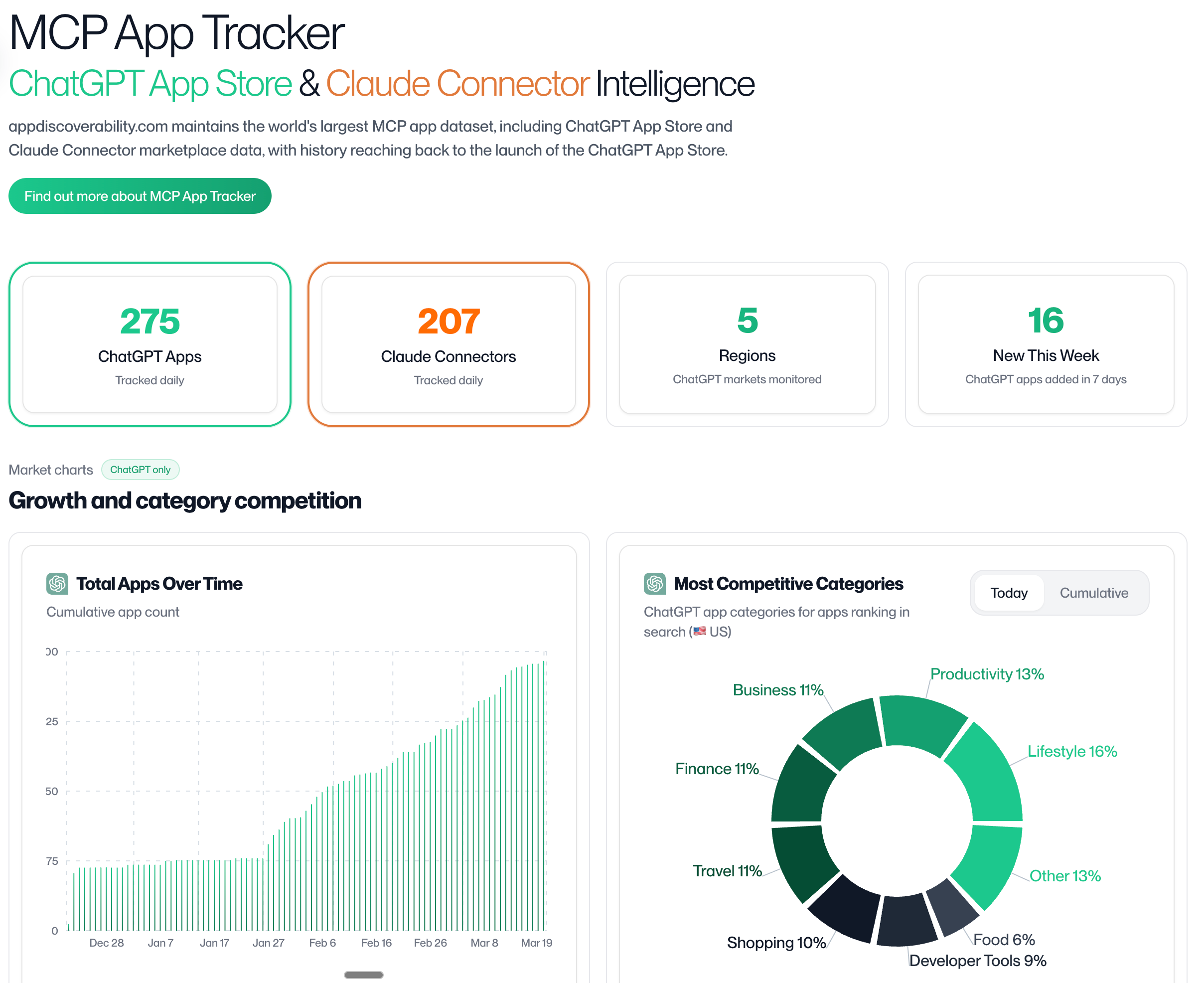
MCP App Tracker
Getting Discovered
Building the app is step one. Getting it found is step two.
AppDiscoverability.com helps your MCP App get discovered. See more on how discoverability works for MCP Apps here in a talk given by Elliot Garreffa at MCP Connect in Paris.
Useful Resources
📺 How to Build a ChatGPT App with Fractal — Full walkthrough: https://www.youtube.com/watch?v=vajCe9XABg4
📺 How to Design World-Class ChatGPT Apps: https://www.youtube.com/watch?v=X3k3YoD0NrQ
📺 How to Get Your ChatGPT App Discoverable: https://www.youtube.com/watch?v=fZ0H1XcATxk
Get Started
1. Sign up at fractal.build — use code FRAC20 for 20% off
2. Find your idea at track.appdiscoverability.com
3. Check your MCP App discovered appdiscoverability.com
Questions? Join our Discord community at https://discord.com/invite/vTBjtMp6NF - builders, developers, and companies all figuring this out together.
Ready to build your MCP App?
Book a strategy call with our team to understand what ChatGPT & Claude Apps can mean for your business